

Βασικά σημεία
-
Καθορίστε πρώτα τους στόχους ευελιξίας σας. Αυτό το βήμα διαμορφώνει κάθε επόμενη επιλογή.
-
Ταιριάξτε τις κάμερες με το μέγεθος της αίθουσης και το στυλ διδασκαλίας. Μια μεγάλη αίθουσα χρειάζεται διαφορετικό εξοπλισμό από ένα μικρό δωμάτιο.
-
Σχεδιάστε για ανάπτυξη από την πρώτη μέρα. Μια πολυεπίπεδη προσέγγιση διατηρεί το κόστος χαμηλά και τις επιλογές ανοιχτές.
-
Δοκιμάστε το σύστημά σας πριν από τα ζωντανά μαθήματα. Αυτό αποτρέπει τις εκπλήξεις και διασφαλίζει την ομαλή λειτουργία.
-
Επιλέξτε υλικό που ενσωματώνεται με την υφιστάμενη εγκατάσταση AV σας. Αυτό αποτρέπει την εξάρτηση από έναν μόνο προμηθευτή και εξοικονομεί χρήματα.
Ορισμός απαιτήσεων ευέλικτης καταγραφής διαλέξεων
Η ευελιξία ξεκινά με ειλικρινείς απαντήσεις σχετικά με τις αίθουσές σας. Μια κάμερα 4K Lecturer Tracking PTZ Camera ταιριάζει σε μια μεγάλη αίθουσα, ενώ μια κάμερα USB Lecturer Tracking PTZ Camera ταιριάζει σε έναν μικρό χώρο συνεργασίας. Ταιριάξate το υλικό με τον χώρο πριν αγοράσετε οτιδήποτε.
Αξιολόγηση αιθουσών και στυλ διδασκαλίας
Το μέγεθος της αίθουσας, η διάταξη των καθισμάτων και το στυλ διδασκαλίας καθορίζουν τον αριθμό των καμερών και τον σχεδιασμό του ήχου. Χρησιμοποιήστε τον παρακάτω πίνακα ως αρχικό φίλτρο.
|
Μέγεθος αίθουσας / τύπος χώρου |
Στυλ διδασκαλίας |
Επίπτωση σε κάμερα και ήχο |
|---|---|---|
|
Αίθουσα διαλέξεων (40+ θέσεις) |
Καταγραφή και ροή διάλεξης μίας κατεύθυνσης |
Σύστημα πολλαπλών καμερών· μικρόφωνο πέτου ή πodium, όχι το μικρόφωνο του χώρου |
|
Τυπική αίθουσα διδασκαλίας (20–35 φοιτητές/μαθητές) |
Ζωντανή διδασκαλία με απομακρυσμένους φοιτητές/μαθητές |
Ενιαία, συγχωρητική συσκευή· κάλυψη σε όλο τον χώρο και ισχυρός ήχος για την απομακρυσμένη πλευρά |
|
Μικρή αίθουσα διδασκαλίας (4–10 άτομα) |
Συνεδρίες μικρών ομάδων |
Λήψη ήχου σε ολόκληρο τον χώρο· αποφύγετε τη δυσκολία ρύθμισης και την ηχώ |
|
Αίθουσα συσκέψεων (6–18 άτομα) |
Συσκέψεις προσωπικού, κλήσεις διοικητικού συμβουλίου |
Διατηρήστε τα άτομα στο κάδρο· αποτρέψτε την αλλοιωμένη ομιλία κατά μήκος του τραπεζιού |
Ένας βασικός κανόνας ισχύει εδώ. Αν χρειάζεστε καταγραφή, αγοράστε για καταγραφή. Αν χρειάζεστε ζωντανή υβριδική αλληλεπίδραση, αγοράστε για αλληλεπίδραση. Όταν και τα δύο έχουν σημασία σε έναν χώρο, δώστε προτεραιότητα στην αλληλεπίδραση, επειδή μια κάμερα αρκετά καλή για ζωντανή υβριδική διδασκαλία παράγει αποδεκτή καταγραφή, ενώ το αντίστροφο σπάνια ισχύει.
Το στυλ διδασκαλίας αλλάζει επίσης τη συμπεριφορά της κάμερας. Η παρουσίαση σε στυλ διάλεξης λειτουργεί καλά με μια κάμερα PTZ σε λειτουργία παρακολούθησης κίνησης. Τα σεμινάρια στρογγυλής τράπεζας χρειάζονται παρακολούθηση φωνής, όπου η κάμερα εναλλάσσεται μεταξύ των ομιλητών. Οι υβριδικές συνεδρίες συχνά χρησιμοποιούν εικόνα-εντός-εικόνας, ώστε οι απομακρυσμένοι φοιτητές να βλέπουν τον παρουσιαστή και ολόκληρο τον χώρο.
Καθορισμός στόχων επεκτασιμότητας και προϋπολογισμού
Σχεδιάστε για ανάπτυξη σε πολλές αίθουσες, όχι μόνο σε μία εγκατάσταση. Μια κλιμακωτή προσέγγιση διατηρεί το κόστος σε λογικά επίπεδα. Το Επίπεδο 1 καλύπτει έναν μόνο εκπαιδευτικό με μια ευρυγώνια κάμερα web USB και ένα μικρόφωνο διάσκεψης USB. Το Επίπεδο 2 προσθέτει μια κάμερα PTZ με διάταξη 6 μικροφώνων για εβδομαδιαία υβριδικά σεμινάρια. Το Επίπεδο 3 εξυπηρετεί μεγάλες αίθουσες με πολλαπλές κάμερες, διάταξη μικροφώνων οροφής και αποκλειστική υποστήριξη AV.
Η αυτοματοποιημένη καταγραφή διαλέξεων μπορεί να ξεκινήσει και να σταματήσει την εγγραφή με βάση προγραμματισμένα μαθήματα. Αυτή η λειτουργία μειοί τη χειροκίνητη παρέμβαση και απελευθερώνει το προσωπικό σας. Οι στόχοι ευελιξίας σας θα πρέπει επίσης να καλύπτουν την ενσωμάτωση LMS, τους υπότιτλους και το περιεχόμενο με δυνατότητα αναζήτησης, ώστε η πλατφόρμα καταγραφής διαλέξεων να πληροί τα πρότυπα προσβασιμότητας. Αναζητήστε εργαλεία καταγραφής διαλέξεων συμβατά με το ada όταν συγκρίνετε προμηθευτές.
Οι επεκτάσιμες αναπτύξεις σε πολλαπλές αίθουσες απαιτούν κεντρική διαχείριση. Η WINSAFE Technology υποστηρίζει αυτόν τον τύπο ανάπτυξης και το υλικό της λειτουργεί σε διάφορους τύπους αιθουσών. Ορίστε τον προϋπολογισμό σας γύρω από το επίπεδο που χρειάζεστε σήμερα, στη συνέχεια επιβεβαιώστε τη διαδρομή προς το επόμενο επίπεδο.
Βασικά εξαρτήματα για την εγγραφή διαλέξεων
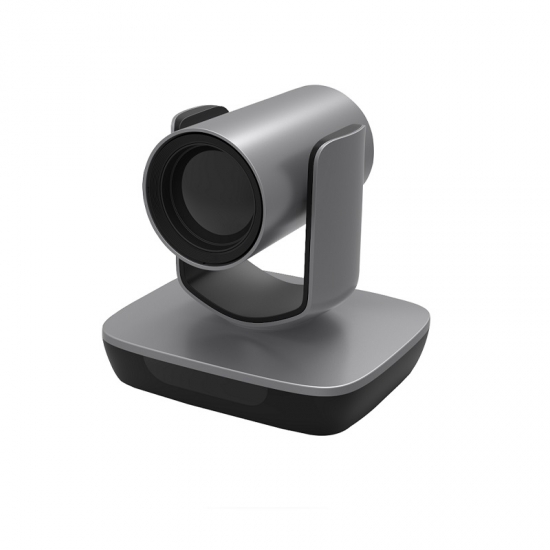
Οι κάμερες εγγραφής διαλέξεων αποτελούν τη βάση ολόκληρου του συστήματος. Έχετε τρεις κύριους τύπους προς εξέταση. Οι κάμερες PTZ προσφέρουν μηχανοκίνητο έλεγχο οριζόντιας και κατακόρυφης κίνησης (pan, tilt) και ζουμ για την παρακολούθηση ενός παρουσιαστή σε μια σκηνή. Οι σταθερές κάμερες παρέχουν σταθερή, ευρυγώνια κάλυψη μιας αίθουσας ή του κοινού. Οι κάμερες 360° καταγράφουν ολόκληρο τον χώρο με έναν φακό, επιτρέποντάς σας να αλλάζετε ψηφιακά το πλαίσιο προβολής κατά την αναπαραγωγή. Για τις περισσότερες αίθουσες, θα συνδυάσετε αυτούς τους τύπους. Τοποθετήστε μια κάμερα PTZ στο πίσω μέρος μιας αίθουσας διαλέξεων για την παρακολούθηση του παρουσιαστή. Τοποθετήστε σταθερές κάμερες στις μπροστινές γωνίες για λήψεις αντίδρασης του κοινού. Τοποθετήστε μια κάμερα 360° στην οροφή για συζητήσεις τύπου σεμιναρίου όπου οι άνθρωποι κάθονται σε κύκλο.
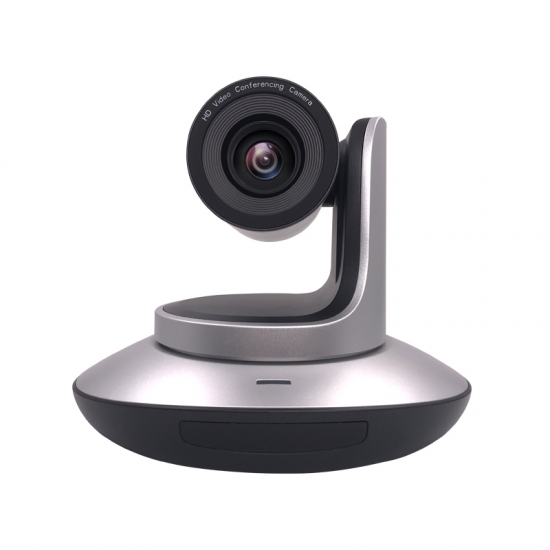
Όταν επιλέγετε κάμερες διαλέξεων για διαφορετικούς χώρους, ταιριάξτε το μοντέλο με το μέγεθος της αίθουσας. Μια κάμερα 4K Lecturer Tracking PTZ Camera λειτουργεί καλά σε μεγάλες αίθουσες όπου χρειάζεστε ευκρινείς λεπτομέρειες στις διαφάνειες και στις χειρονομίες του παρουσιαστή. Μια κάμερα USB Lecturer Tracking PTZ Camera ταιριάζει σε μικρότερες αίθουσες διδασκαλίας όπου θέλετε απλότητα plug-and-play χωρίς αποκλειστική υποδομή βίντεο. Και οι δύο επιλογές σάς προσφέρουν μηχανοκίνητη παρακολούθηση χωρίς να απαιτούν ανθρώπινο χειριστή πίσω από τον φακό.
Λογισμικό παρακολούθησης AI και καταγραφής διαλέξεων
Η σύγχρονη παρακολούθηση AI εξαλείφει πλήρως την ανάγκę χειροκίνητης λειτουργίας της κάμερας. Μια κάμερα παρακολούθησης AI υбриδικής τάξης εντοπίζει τον ομιλητή μέσω αναγνώρισης προσώπου ή σώματος πρώτα. Στη συνέχεια, καθορίζει μια ζώνη κάδρων που ορίζει πού πρέπει να κάθεται το υποκείμενο συνθέτικά μέσα στο πλάνο. Η κάμερα κινεί τους κινητήρες της μόνο όταν ο ομιλητής κινείται έξω από αυτή τη ζώνη. Αυτό αποτρέπει τις συνεχείς μικρορυθμίσεις που θα έκαναν τους θεατές να αισθάνονται ζάλη. Το σύστημα προβλέπει επίσης μοτίβα κίνησης για τη διαχείριση της φυσικής συμπεριφοράς ρυθμού χωρίς ορατή καθυστέρηση. Οι απομακρυσμένοι μαθητές σας βλέπουν ομαλές μεταβάσεις αντί για απότομη αναζήτηση κάμερας.
Η ίδια προσέγγιση που βασίζεται στην ευφυΐα αιχμής τροφοδοτεί σενάρια πολλαπλών ομιλητών. Όταν κάποιος άλλος αρχίζει να μιλάει, η προβολή μετατοπίζεται σε αυτόν αυτόματα. Οι απομακρυσμένοι συμμετέχοντες μπορούν να παρακολουθήσουν ποιος μιλάει χωρίς να ζητήσουν από κανέναν να μετακινήσει μια κάμερα. Αυτό κάνει την εγγραφή βίντεο διαλέξεων να φαίνεται επαγγελματική ακόμα και όταν δεν υπάρχει προσωπικό παραγωγής στον χώρο.
Η καταγραφή ήχου αξίζει ίσης προσοχής. Οι συστοιχίες μικροφώνων οροφής καταγράφουν ομιλία σε μια ευρεία περιοχή για αίθουσες σεμιναρίων. Τα μικρόφωνα πέτου προσφέρουν καθαρότερο ήχο για διαλέξεις ενός ομιλητή. Θέλετε ομιλία που παραμένει κατανοητή ακόμα και όταν κάποιος είναι στραμμένος προς τον πίνακα.
Επιλογή καμερών εγγραφής διαλέξεων
Το υλικό καταγραφής διαλέξεων συνδέει τα πάντα μεταξύ τους. Οι κωδικοποιητές υλικού δέχονται ροές από τις κάμερες καταγραφής διαλέξεων και τις επεξεργάζονται σε ροές με δυνατότητα καταγραφής. Ο κωδικοποιητής Pearl-2 υποστηρίζει έξι ή περισσότερες εισόδους σε ανάλυση 4K με έως και έξι κωδικοποιημένα κανάλια. Το Pearl Mini διαχειρίζεται τρεις εισόδους HD με τρία κωδικοποιημένα κανάλια για μικρότερες εγκαταστάσεις. Το Pearl Nexus προσφέρει τρεις εισόδους HD σε έναν συμπαγή συντελεστή μορφής 1RU, ιδανικό για εγκαταστάσεις σε ικρίωμα (rack). Το Pearl Nano παρέχει δύο εισόδους 4K ως κωδικοποιητής ενός κανalιού για απλές ρυθμίσεις.
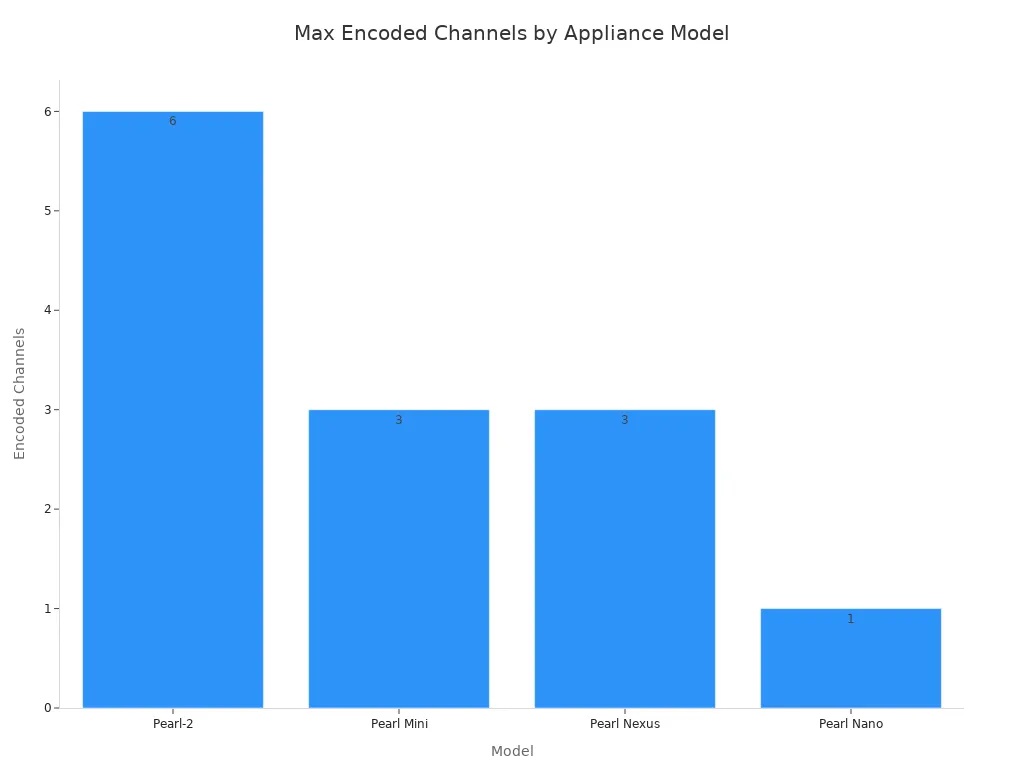
Αυτοί οι κωδικοποιητές σάς επιτρέπουν να καταγράφετε πολλές ροές ταυτόχρονα από διαφορετικές πηγές. Μπορείτε να καταγράψετε ταυτόχρονα μια ροή κάμερας PTZ, μια κάμερα εγγράφων που δείχνει χειρόγραφες σημειώσεις και την έξοδο ενός φορητού υπολογιστή με διαφάνειες παρουσίασης. Οι κάρτες καταγραφής όπως η AV.io SDI+ δέχονται σήματα SD-SDI, HD-SDI και 3G-SDI έως ανάλυση 1080p για τη σύνδεση επαγγελματικών καμερών.
Το λογισμικό καταγραφής διαλέξεων διαχειρίζεται τα προγράμματα καταγραφής, τις ροές εργασίας καταγραφής πολλαπλών πηγών και τις μορφές εξόδου. Το καλό λογισμικό υποστηρίζει ταυτόχρονη καταγραφή HD και SD. Θα πρέπει να χειρίζεται κάμερες εγγράφων ως πηγές εισόδου μαζί με τις κύριες κάμερές σας. Αναζητήστε λειτουργίες με τεχνητή νοημοσύνη (AI), όπως η αυτόματη αναγνώριση ομιλητή και η ανίχνευση σκηνών, οι οποίες απλοποιούν την επεξεργασία μετά την παραγωγή.
Η καταγραφή διαλέξεων που βασίζεται σε λογισμικό σάς προσφέρει ευελιξία χωρίς την ανάγκη επένδυσης σε αποκλειστικό υλικό. Μπορείτε να το εκτελέσετε σε υπάρχοντες υπολογιστές αιθουσών διδασκαλίας, υποστηρίζοντας παράλληλα πολλές πηγές εισόδου μέσω καρτών καταγραφής USB.
Σχεδιασμός κλιμακούμενης αρχιτεκτονικής καταγραφής διαλέξεων
Η αρχιτεκτονίδα καταγραφής διαλέξεων σας πρέπει να διαχειρίζεται πολλαπλές αίθουσες, διάφορους αριθμούς καμερών και διαφορετικούς τύπους σήματος χωρίς να επιβάλλει έναν πλήρη επανασχεδιασμό. Οι επιλογές διεπαφής που κάνετε σήμερα καθορίζουν πόσο εύκολα θα επεκταθείτε αύριο.
Συμβατότητα Διεπαφής και Ροή Σήματος
Κάθε κάμερα καταγραφής διαλέξεων που επιλέγετε υποστηρίζει μία ή περισσότερες γλώσσες διεπαφής. Ο παρακάτω πίνακας δείχνει πώς κάθε διεπαφή διαμορφώνει την εγκατάστασή σας.
|
Διεπαφή |
Ρόλος στην Αρχιτεκτονική Καταγραφής Διαλέξεων Πολλαπλών Κμερών με Δυνατότητα Κλιμάκωσης |
|---|---|
|
3G-SDI |
Παρέχει ψηφιακό βίντεο μέσω ομοαξονικής καλωδίωσης απευθείας σε μεταγωγείς εκπομπής ή υποδομή SDI |
|
HDMI |
Τροφοδοτεί τοπικές εγκαταστάσεις παρακολούθησης ή υλικό παρουσίασης βίντεο |
|
USB |
Παρέχει δυνατότητα σύνδεσης απευθείας σε συστήματα λήψης κεντρικού υπολογιστή |
|
IP |
Δρομολογεί δεδομένα ροής σε τοπικά δίκτυα ή υποδομή ευρείας ζώνης για έλεγχο PTZ πολλαπλών καμερών |
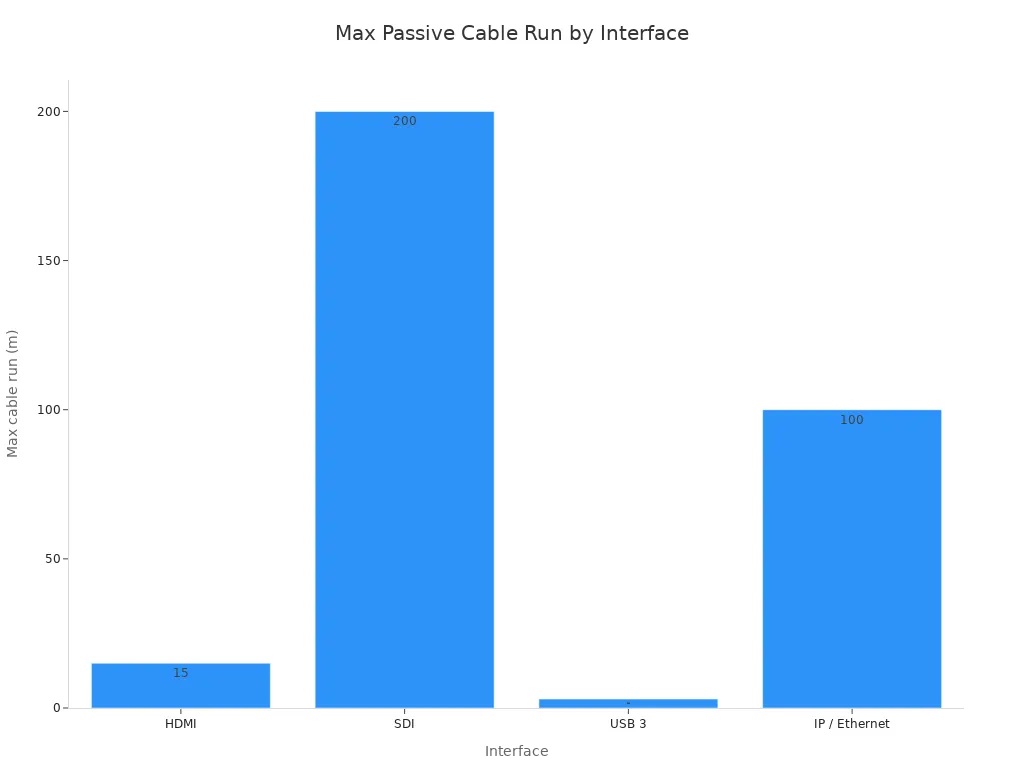
Το μήκος της διαδρομής καλωδίου έχει τόση σημασία όσο και ο τύπος σύνδεσης. Το HDMI φτάνει περίπου τα 15 μέτρα παθητικά. Το SDI φτάνει έως και τα 200 μέτρα μέσω καλωδίου RG59 ή RG6. Η θύρα USB 3 διαχειρίζεται περίπου 3 μέτρα χωρίς ενεργούς ενισχυτές σήματος. Το IP μέσω Ethernet φτάνει τα 100 μέτρα σε καλωδίωση Cat 5 ή Cat 6. Για μεγάλα αμφιθέατρα, το SDI ή το IP σας δίνει την εμβέλεια που χρειάζεστε. Για μικρές αίθουσες διδασκαλίας, το USB προσφέρει απλότητα σύνδεσης και άμεσης λειτουργίας (plug-and-play).Κάμερες PTZ Παρακολούθησης Ομιλητή USBσυνδέονται απευθείας σε έναν κεντρικό υπολογιστή χωρίς αποκλειστική υποδομή βίντεο, καθιστώντας τις ιδανικές για συμπαγείς χώρους.
Οι σύνδεσμοι SDI διαθέτουν μηχανισμό ασφάλισης, καθιστώντας τους τον πιο ασφαλή τρόπο σύνδεσης του εξοπλισμού σας. Επιπλέον, το SDI μπορεί να μεταδώσει σήματα σε μεγαλύτερες αποστάσεις από το HDMI.
Η ροή σήματος ακολουθεί μια σαφή διαδρομή. Οι κάμερες και τα μικρόφωνα καταγράφουν βίντεο και ήχο. Μια κάρτα λήψης ή συσκευή μορφοποιεί αυτά τα σήματα για τον υπολογιστή ή το δίκτυό σας. Το λογισμικό εγγραφής και κωδικοποίησης διαχειρίζεται ταυτόχρονες ροές, όπως βίντεο δασκάλου και περιεχόμενο διαφανειών, και τις κωδικοποιεί σε ένα συγχρονισμένο αρχείο. Αυτό το αρχείο μεταφέρεται σε ασφαλή αποθήκευση στο cloud με ευρετηρίαση με χρονική σήμανση. Τέλος, μια πλατφόρμα διανομής με ελέγχους πρόσβασης παραδίδει το περιεχόμενο στους μαθητές μέσω του LMS σας.
Η τροφοδοσία μέσω Ethernet (Power over Ethernet) απλοποιεί τη φυσική εγκατάσταση. Το PoE παρέχει ροές βίντεο, σήματα ελέγχου, ενδείξεις tally και ισχύ λειτουργίας μέσω ενός μόνο καλωδίου δικτύου. Αυτό μειώνει την ακαταστασία των καλωδίων στα αμφιθέατρα, επιτρέποντας παράλληλα τον δομημένο έλεγχο PTZ πολλαπλών καμερών σε τοπικά δίκτυα IP.
Δίκτυο, απομακρυσμένη διαχείριση και ενοποίηση
Η ραχοκοκαλιά του δικτύου σας πρέπει να υποστηρίζει την κυκλοφορία που παράγουν οι κάμερές σας. Μια κάμερα 1080p που χρησιμοποιεί συμπίεση H.264 καταναλώνει 1-4 Mbps. Μια κάμερα 4K χρειάζεται 4-16 Mbps με H.264 ή 4-6 Mbps με H.265. Για οκτώ κάμερες 1080p που πραγματοποιούν τοπική εγγραφή, υπολογίστε 16-32 Mbps στο εσωτερικό σας δίκτυο. Η μεταφόρτωση στο cloud απαιτεί σταθερά 8-16 Mbps. Προσθέστε ένα απόθεμα (buffer) 30-40% στο υπολογισμένο εύρος ζώνης σας για μελλοντική ανάπτυξη. Χρησιμοποιήστε καλωδίωση Cat6 ή Cat6a, διακόπτες (switches) επαγγελματικής κλάσης με PoE+ και αποκλειστικό VLAN για την κίνηση λήψης διαλέξεων.
Η κεντρική απομακρυσμένη διαχείριση διατηρεί την τεχνική σας εγκατάσταση υπό έλεγχο σε όλη την πανεπιστημιούπολη. Παρακolouθείτε την κατάσταση της συσκευής, προγραμματίζετε την εκκίνηση και τον τερματισμό λειτουργίας, εφαρμόζετε συνεπείς ρυθμίσεις δωματίου και μειώνετε την αντιμετώπιση προβλημάτων επί τόπου. Ο πλήρης απομακρυσμένος έλεγχος περιεχομένου σας επιτρέπει να διαμορφώνετε ρυθμίσεις, να ξεκινάτε ή να διακόπτετε ροές και να επαληθεύετε ροές βίντεο από οποιαδήποτε τοποθεσία. Η 24/7 παρακολούθηση συσκευών παρακολουθεί τη θερμοκρασία, τον αποθηκευτικό χώρο και το φόρτο του συστήματος. Οι προσαρμοσμένες ειδοποιήσεις σάς ειδοποιούν αμέσως όταν παρουσιαστεί αστοχία σήματος ή προβλήματα φόρτου συστήματος.
Ο υλικός εξοπλισμός λήψης διαλέξεων θα πρέπει να ενσωματώνεται στην υπάρχουσα υποδομή AV αντί να την αντικαθιστά. Το AV over IP μεταδίδει ήχο και βίντεο στο δίκτυο της πανεπιστημιούπολης αντί για παραδοσιακή καλωδίωση, απλοποιώντας τη διανομή μεταξύ των κτιρίων. Πλατφόρμες αποκλειστικά λογισμικού όπως το Utelogy συνδέουν κάθε συσκευή AV και UC σε μια ενιαία διεπαφή, παρέχοντας στις ομάδες IT παρακολούθηση σε πραγματικό χρόνο, απομακρυσμένο έλεγχο και αυτοματοποιημένες δοκιμές χωρίς αντικατάσταση εξοπλισμού.
Η τεχνολογία WINSAFE υποστηρίζει αυτήν την ευέλικτη, κλιμακούμενη προσέγγιση. Ο υλικός τους εξοπλισμός λειτουργεί σε πολλαπλούς τύπους δωματίων και πρότυπα διεπαφών, ώστε να αποφεύγετε την εξάρτηση από συγκεκριμένο προμηθευτή (vendor lock-in) ενώ χτίζετε μια πλατφόρμα λήψης διαλέξεων που μεγαλώνει μαζί με το ίδρυμά σας. Μια υбриδική κάμερα παρακολούθησης AI για αίθουσες διδασκαλίας, για παράδειγμα, ενσωματώνεται ομαλά σε αυτήν την αρχιτεκτονική, ακολουθώντας τους παρουσιαστές αυτόματα ενώ το δίκτυό σας διαχειρίζεται τη ροή. Τα πιο ευέλικτα συστήματα λήψης διαλέξεων ξεκινούν με τον σχεδιασμό διεπαφών και όχι με τη συσσώρευση υλικού.
Υλοποίηση και βελτιστοποίηση λήψης διαλέξεων
Οδηγός ανάπτυξης βήμα προς βήμα
Ξεκινήστε με μια ενδελεχή αξιολόγηση χώρου. Εξετάστε τη διάταξη κάθε αίθουσας διδασκαλίας, τον υπάρχοντα εξοπλισμό AV και την ετοιμότητα δικτύου. Δημιουργήστε ένα προσαρμοσμένο σχέδιο ανάπτυξης για κάθε χώρο. Αυτό το βήμα αποτρέπει εκπλήξεις κατά την εγκατάσταση και σας βοηθά να ταιριάξετε Κάμερες PTZ Παρακολούθησης Ομιλητή 4Kμε τις συγκεκριμένες ανάγκες κάθε δωματίου.
Ακολουθήστε αυτά τα βήματα ανάπτυξης για μια ομαλή εφαρμογή:
-
Πραγματοποιήστε μια αξιολόγηση χώρου για να ελέγξετε τις διατάξεις των αιθουσών διδασκαλίας, τον τρέχοντα εξοπλισμό AV και την ετοιμότητα του δικτύου, και στη συνέχεια δημιουργήστε ένα προσαρμοσμένο σχέδιο ανάπτυξης.
-
Σχεδιάστε και εγκαταστήστε την υποδομή συστήματος που απαιτείται για εγγραφή υψηλής ποιότητας και αξιόπιστη μετάδοση δεδομένων.
-
Παρέχετε ενσωχώση και εκπαίδευση στο διδακτικό προσωπικό σχετικά με τη λειτουργία εργαλείων εγγραφής, τη διαχείριση περιεχομένου και τη χρήση αναλυτικών στοιχείων.
-
Προσφέρετε συνεχή υποστήριξη για τη συντήρηση του εξοπλισμού, την επίλυση τεχνικών ζητημάτων και την εφαρμογή ενημερώσεων καθώς η τεχνολογία αλλάζει.
Κατά την εγκατάσταση, τοποθετήστε τις κάμερές σας στρατηγικά. Τοποθετήστε μια 4K Lecturer Tracking PTZ Camera στο πίσω μέρος ενός αμφιθεάτρου για ευρεία κάλυψη του ομιλητή. Εγκαταστήστε μια USB Lecturer Tracking PTZ Camera σε μικρότερες αίθουσες όπου η απλότητα plug-and-play έχει σημασία. Περάστε καλωδίωση με σωστό σχεδιασμό μήκους—τα SDI φτάνουν έως και 200 μέτρα, ενώ το HDMI λειτουργεί μόνο σε απόσταση έως 15 μέτρων. Διαμορφώστε το λογισμικό καταγραφής διαλέξεων για να διαχειρίζεται τον προγραμματισμό μέσω του LMS σας. Συστήματα όπως το EchoVideo ενσωματώνονται με Canvas, Blackboard, Moodle και D2L/Brightspace μετά τη διαμόρφωση API. Αυτός ο αυτοματισμός επιτρέπει στις εγγραφές να ξεκινούν και να σταματώνουν με βάση το πρόγραμμα του μαθήματός σας χωρίς μηχανική παρέμβαση.
Δοκιμές, Αντιμετώπιση Προβλημάτων και Ρύθμιση
Δοκιμάστε την ακρίβεια παρακολούθησης AI πριν από την πρώτη ζωντανή συνεδρία. Ζητήστε από έναν ομιλητή να περπατήσει σε ολόκληρη την περιοχή διδασκαλίας ενώ παρακολουθείτε την κάμερα να ακολουθεί ομαλά. Επαληθεύστε τη λήψη ήχου από κάθε ζώνη καθισμάτων. Ελέγξτε την εναλλαγή πολλαπλών καμερών μεταξύ της κάμερας του ομιλητή, της κάμερας εγγράφων και της εισόδου διαφανειών. Μια Hybrid Classroom AI Tracking Camera θα πρέπει να προβλέπει τα μοτίβα κίνησης και να αποφεύγει τις συνεχείς μικρο-ρυθμίσεις που προκαλούν δυσφορία στον θεατή.
Αντιμετωπίστε τα συνήθη ζητήματα συστηματικά. Η απώλεια παρακολούθησης συμβαίνει συχνά όταν ο ομιλητής κινείται πίσω από έπιπλα ή φοράει ρούχα που ταιριάζουν με το φόντο. Τα προβλήματα καθυστέρησης συνήθως οφείλονται στο εύρος ζώνης του δικτύου—να θυμάστε ότι οκτώ κάμερες 1080p χρειάζονται 16-32 Mbps στο εσωτερικό σας δίκτυο. Οι ασυμφωνίες διεπαφών συμβαίνουν όταν συνδέετε πηγές HDMI σε υποδομή SDI χωρίς τους κατάλληλους μετατροπείς.
Βελτιστοποιήστε την πλατφόρμα καταγραφής διαλέξεων τόσο για ζωντανή ροή όσο και για προβολή κατά παραγγελία. Οι σύγχρονες καινοτομίες υλικού μειώνουν λειτουργικό φόρτο στο διδακτικό προσωπικό. Οι πλατφόρμες που βασίζονται στο cloud επιτρέπουν απρόσκοπτη αποθήκευση και διανομή σε πολλαπλές συσκευές. Ο παρακάτω πίνακας δείχνει πώς διαφορετικά εξαρτήματα ενισχύουν την παράδοσή σας.
|
Δυνατότητα |
Πώς βελτιστοποιεί τη ζωντανή ροή και την προβολή κατά παραγγελία |
|---|---|
|
Επεξεργαστής πολυμέσων 4-σε-1 |
Υποστηρίζει εγγραφή, εναλλαγή, μίξη και ζωντανή ροή ταυτόχρονα, επιτρέποντας ζωντανή ροή και εγγραφή διαλέξεων με το πάτημα ενός κουμπιού. |
|
Κάμερα αυτόματης παρακολούθησης |
Ακολουθεί και κεντράρει αυτόματα έναν κινούμενο εκπαιδευτή χωρίς να απαιτείται χειριστής, βελτιώνοντας την ποιότητα της ζωντανής καταγραφής. |
|
Κάμερες PTZ |
Επιτρέπουν απομακρυσμένο έλεγχο pan, tilt και zoom ώστε οι χειριστές να μπορούν να προσαρμόζουν τις προβολές κατά τη διάρκεια ζωντανών συνεδριών. |
|
Κάμερες εγγράφων |
Καταγράφουν εικόνες βιβλίων ή αντικειμένων σε πραγματικό χρόνο και τις εμφανίζουν στην οθόνη. |
|
Διαδικτυακή αναθεώρηση 24/7 |
Οι καταγεγραμμένες διαλέξεις επιτρέπουν στους μαθητές να επανεξετάζουν το καταγεγραμμένο υλικό του μαθήματος οποτεδήποτε και οπουδήποτε. |
Ρυθμίστε υπότιτλους και μεταγραφή για προσβασιμότητα. Τα εργαλεία μεταγραφής που τροφοδοτούνται από τεχνητή νοημοσύνη δημιουργούν αυτόματα κείμενο με δυνατότητα αναζήτησης. Αυτό καθιστά τις εγγραφές των βίντεο διαλέξεών σας συμβατές με τα πρότυπα προσβασιμότητας και βοηθά τους μαθητές να βρίσκουν συγκεκριμένα θέματα γρήγορα. Η τεχνική σας εγκατάσταση θα πρέπει να περιλαμβάνει τακτικούς ελέγχους συντήρησης και ενημερώσεις υλικολογισμικού. Παρακolουθήστε την κατάσταση της συσκευής κεντρικά για να εντοπίσετε αστοχίες σήματος προτού επηρεάσουν τα μαθήματα. Με τη σωστή δοκιμή και ρύθμιση, το υλικό καταγραφής διαλέξεων προσφέρει αξιόπιστη απόδοση σε κάθε αίθουσα του ιδρύματός σας.
Τώρα έχετε μια σαφή πορεία. Ορίστε πρώτα τους στόχους ευελιξίας. Στη συνέχεια, επιλέξτε συμβατές κάμερες εγγραφής διαλέξεων και παρακολούθηση AI. Μετά, οικοδομήστε μια κλιμακούμενη αρχιτεκτονική. Τέλος, δοκιμάστε τα πάντα σχολαστικά. Η ευελιξία προέρχεται από τον έγκαιρο σχεδιασμό διεπαφών, προγραμματισμού και επεκτασιμότητας. Ποτέ δεν προέρχεται από την προσθήκη υλικού αργότερα.
Τα συστήματα καταγραφής διαλέξεων πολλαπλών καμερών βελτιώνουν μετρήσιμα τα αποτελέσματα των φοιτητών, με την υψηλότερη βαθμολογία να φτάνει το 83,00 σε μία μελέτη.
Αξιολογήστε λύσεις καταγραφής διαλέξεων όπως η WINSAFE Technology. Υποστηρίζουν παρακολούθηση AI πολλαπλών καμερών χωρίς να σας δεσμεύουν σε έναν μόνο προμηθευτή. Καθώς οι διδακτικές ανάγκες εξελίσσονται, η καταγραφή διαλέξεών σας πρέπει να προσαρμόζεται. Αναθεωρήστε τις ηχογραφήσεις των διαλέξεών σας κάθε εξάμηνο. Διατηρήστε τις ηχογραφημένες διαλέξεις σας με δυνατότητα αναζήτησης και προσβάσιμες. Αυτή η συνήθεια κρατά την καταγραφή διαλέξεών σας έτοιμη για ό,τι ακολουθεί.
FAQ
Πόσες κάμερες χρειάζομαι για ένα τυπικό αμφιθέατρο;
Ένα τυπικό αμφιθέατρο χρειάζεται τουλάχιστον δύο κάμερες. Τοποθετήστε μία 4K Lecturer Tracking PTZ Camera στο πίσω μέρος για κάλυψη του ομιλητή. Προσθέστε μια σταθερή κάμερα στο μπροστινό μέρος για λήψεις αντίδρασης του κοινού. Οι μικρές αίθουσες διδασκαλίας ενδέχεται να λειτουργήσουν με μία μόνο USB Lecturer Tracking PTZ Camera.
Μπορεί η παρακολούθηση AI να διαχειριστεί πολλούς ομιλητές σε ένα σεμινάριο;
Ναι. Μια Hybrid Classroom AI Tracking Camera εντοπίζει πρόσωπα και σώματα για να αναγνωρίσει τους ενεργούς ομιλητές. Αλλάζει προβολές αυτόματα όταν κάποιος νέος μιλάει. Το σύστημα προβλέπει τα μοτίβα κίνησης, ώστε οι μεταβάσεις να παραμένουν ομαλές χωρίς ορατή καθυστέρηση. Έχετε επαγγελματική κάλυψη πολλών ομιλητών χωρίς κανένα χειριστή.
Ποια διεπαφή πρέπει να επιλέξω για την εγκατάσταση καταγραφής διαλέξεων;
Ταιριάξτε τη διεπαφή με τις διαδρομές των καλωδίων σας. Χρησιμοποιήστε SDI για αποστάσεις έως 200 μέτρα. Επιλέξτε HDMI για διαδρομές κάτω των 15 μέτρων. Το USB λειτουργεί για ρυθμίσεις plug-and-play κάτω των 3 μέτρων. Το IP over Ethernet φτάνει τα 100 μέτρα και υποστηρίζει Power over Ethernet για απλοποιημένη καλωδίωση.
Πώς συνδέω την καταγραφή διαλέξεων στο LMS μου;
Τα περισσότερα συστήματα καταγραφής διαλέξεων ενσωματώνονται με Canvas, Blackboard, Moodle και D2L/Brightspace μέσω διαμόρφωσης API. Μετά τη ρύθμιση, οι εγγραφές ξεκινούν και σταματούν αυτόματα με βάση το πρόγραμμα του μαθήματός σας. Οι φοιτητές έχουν πρόσβαση στο καταγεγραμμένο περιεχόμενο απευθείας μέσω της πύλης LMS σας χωρίς ξεχωριστές συνδέσεις.
Τι ξεχωρίζει τα καλύτερα συστήματα καταγραφής διαλέξεων από τις βασικές ρυθμίσεις;
Τα καλύτερα συστήματα καταγραφής διαλέξεων προσφέρουν κεντρική διαχείριση, εγγραφή πολλαπλών πηγών και λειτουργίες που τροφοδοτούνται από τεχνητή νοημοσύνη, όπως η αυτόματη αναγνώριση ομιλητή. Υποστηρίζουν κλιμακούμενη ανάπτυξη σε πολλές αίθουσες χωρίς δέσμευση προμηθευτή. Αναζητήστε υλικό που ενσωματώνεται με την υπάρχουσα υποδομή AV και παρέχει απομακρυσμένη παρακολούθηση για ομάδες IT.


 +8613725587481
 sales@winsafecctv.com